
Smarter Faders and Synced LFOs
Build 19 brings a handful of quality-of-life improvements that make Condukt feel more intuitive, especially when working with synths that have lots of discrete parameter options.
Discrete Value Picker
Many synthesizer parameters aren't continuous sliders, they're lists of discrete options. Waveform selectors, filter types, LFO shapes, arpeggiator modes. On hardware, these are often rotary switches or menu selections. In MIDI, they're CC values where 0 might mean Saw, 1 means Square, and so on.
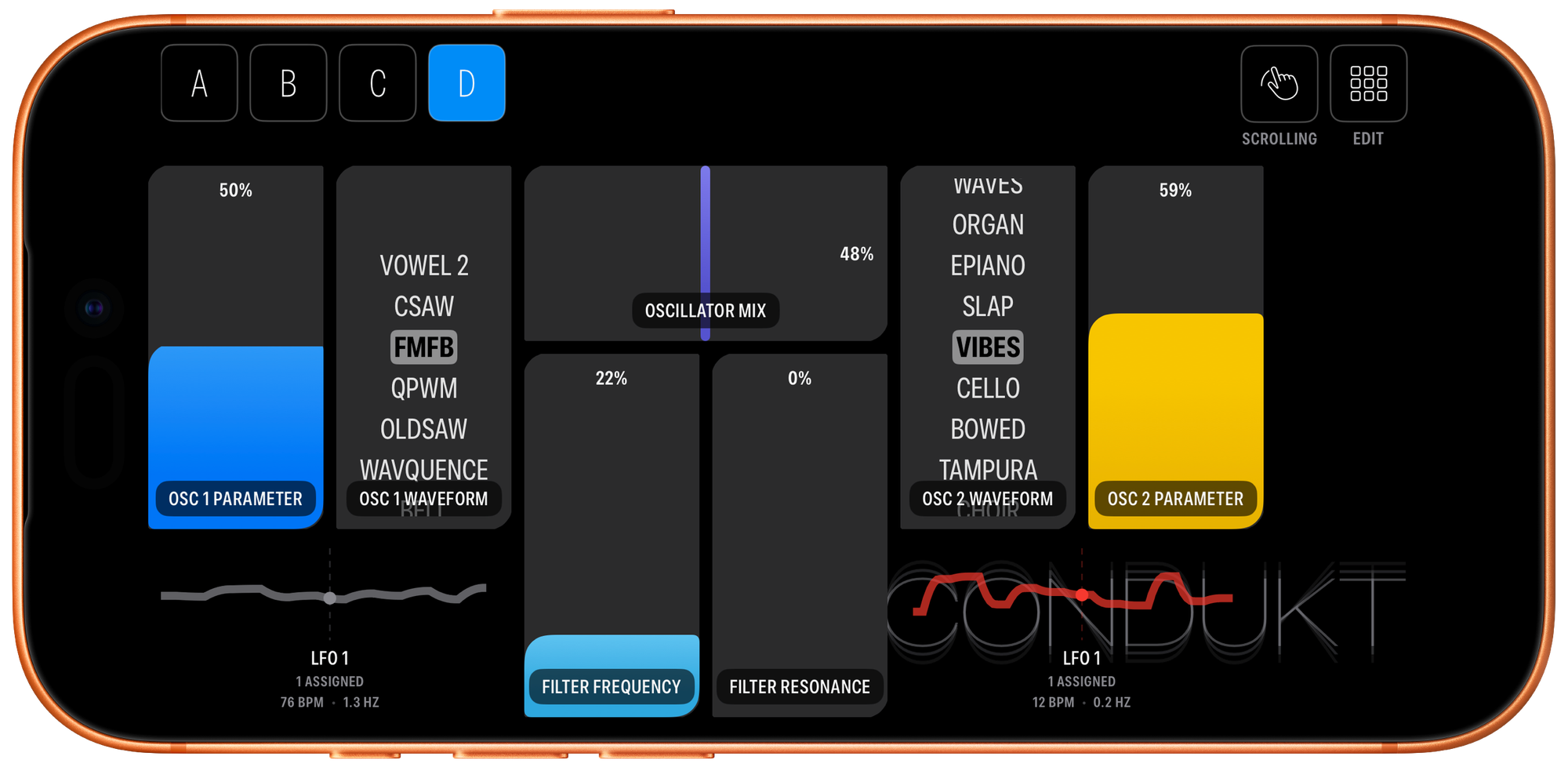
Previously, you'd drag a fader and watch the number change, hoping to land on the right value. Now, for supported synths with MIDI.guide data, Condukt automatically detects discrete parameters and presents them as a scrolling picker.
How It Works
When you add a parameter that has discrete options (like an oscillator waveform or filter type), the fader transforms into a vertical picker showing all available values by name:
- Tap any option to select it instantly
- Scroll through the list to browse options
- The current selection is highlighted; other options fade based on distance
No more memorizing that 64 means Bandpass or that your filter has 12 types starting at CC value 0. The picker shows you exactly what each value does. You can see it in action on Ambika.
Not Working Right?
MIDI.guide data comes from community contributions and may not match every firmware version. If the labels don't line up with your synth's actual behavior, tap the Gear icon on the fader and disable Use Discrete Values in settings. The fader reverts to showing raw MIDI values.
BPM-Synced LFO Rate
LFO modulators now support tempo-synced rate modes. Instead of setting a rate in Hz, you can lock the LFO to your board's BPM using musical beat divisions.
Available divisions: 8/1, 4/1, 2/1, 1/1, 1/2, 1/4, 1/8, 1/16, 1/32
In the LFO editor, switch the rate mode from Absolute (Hz) to Synced (beat division). The rate gesture now cycles through divisions instead of adjusting frequency directly. The overlay shows both the beat division and the effective Hz at your current BPM.
Perfect for rhythmic filter sweeps, tremolo effects that lock to your groove, or slow evolving modulations timed to your track's structure.
Drag Controls Between Surfaces
Rearranging your layout just got easier. You can now drag a control directly onto a surface button (A, B, C, etc.) to move it to that surface.
- The control lands in the first available slot on the target surface
- Surface buttons highlight when you drag over them
- Haptic feedback confirms success (or failure if the surface is full)
No more delete-and-recreate when you realize a control belongs on a different page.
Build 19 is available now on TestFlight, give it a go and please spread the word!