
Condukt 1.4: Meet Painter, a Sequencer You Draw
The latest beta adds Painter, a polyphonic canvas for your short (or long) motifs.
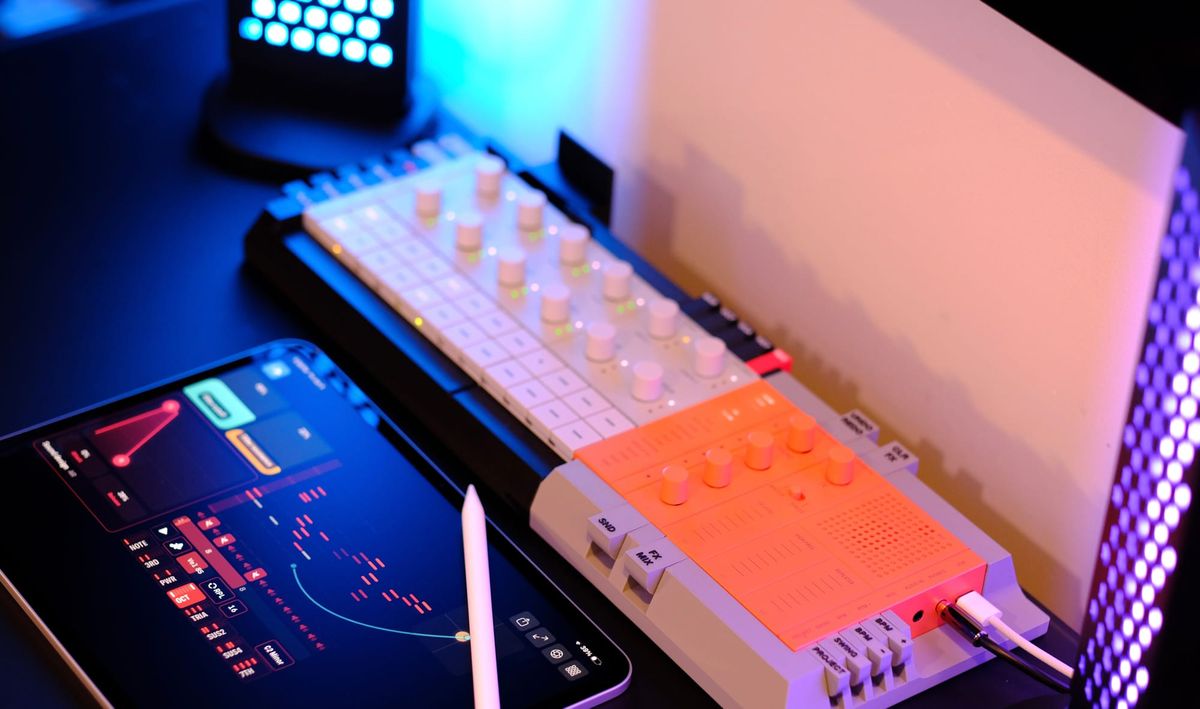
Meet the Painter, a polyphonic sequencer you play by drawing. Add it to a board, draw across a piano roll, and the notes you paint snap to the key and chord you picked. It stays musical even when you're just doodling. Apple Pencil pressure shapes the dynamics, you can scrub the loop by hand, and the Recorder captures the whole thing as MIDI.
Here's how it works.
Paint, and it stays in key
Painter is a chord-quantized polyphonic paint-roll sequencer. Pick a root note and a scale (Major, Minor, both Pentatonics, Dorian, Mixolydian, or Chromatic if you want the full keyboard), and the roll only lets through notes that belong. Drag your finger or Pencil across the grid and you're laying down a part. Every column is a step, and every painted event becomes sound on the next pass of the playhead.
Because the quantization happens the moment you paint, you can move fast and trust that what lands is in key. Mistakes are easy to correct.
Chords or single notes, your call
A chord shape sits behind every stroke. Paint one cell and Painter expands it into the shape you chose:
- Single for melodies
- Third, Power, or Octave for two-note moves
- Triad, Sus2, Sus4 for fuller harmony
- Seventh when you want some color
The shapes are diatonic, so a triad in a minor scale comes out minor without you thinking about it. Stack events in a column up to the voice limit and Painter steals the oldest voice when you go over, or flip on Replace mode so each new touch clears the column first. Replace mode is the one you want for sketching a single-line melody where notes shouldn't pile up.

Pressure!
On iPad with an Apple Pencil, how hard you press sets each note's velocity. Lean in for an accent, ease off for a ghost note, and read it back at a glance: every painted pill's opacity tracks its velocity, so the dynamics of a phrase are visible across the whole grid.
Want it even instead? Tap the velocity slider with your finger and it will set a fixed level for Pencil input. From then on your Pencil paints at that velocity, so you can lay down a steady part without worrying about your touch.
Loops you work with your hands
Set the length to 8, 16, 32, or 64 (!) steps. The roll shows several octaves at once, so you've got room to range. Drag the loop handles in the footer to pick the slice that repeats, and the endpoints and length stay labeled so you always know where you are. Grab the scrubber and move the playhead by hand to audition a section, find the downbeat, or just play the loop like an instrument.
It's a sequencer and a source
Painter doesn't just make notes. The lowest note in each chord is exposed as a routable modulation signal, so you can send Painter's movement into a fader, an LFO target, or anything else on the board, the same way every other control in Condukt routes. You can also send a modulator (like LFO or XY Pad) into Painter and have it move the pitch, while keeping it quantized.
And when you've painted something you like, record it. The Recorder accepts Painter as a capture source, plays it back in a loop, and exports the take as a standard MIDI file you can drop into your DAW. Like everything in Condukt, a Painter you build saves with the board and comes back exactly as you left it.
A couple of notes
Painter ideally wants a 3x3 space on your board, so clear a little room before you add it. And because it's brand new, please send your feedback on how the scrub and the paint feel for you.
That's Condukt 1.4. Go draw something.