
Condukt 1.3: Shareable Boards, On-device Sounds
There's lots new in the latest version of Condukt. Try it yourself on your iPhone, iPad or Mac.
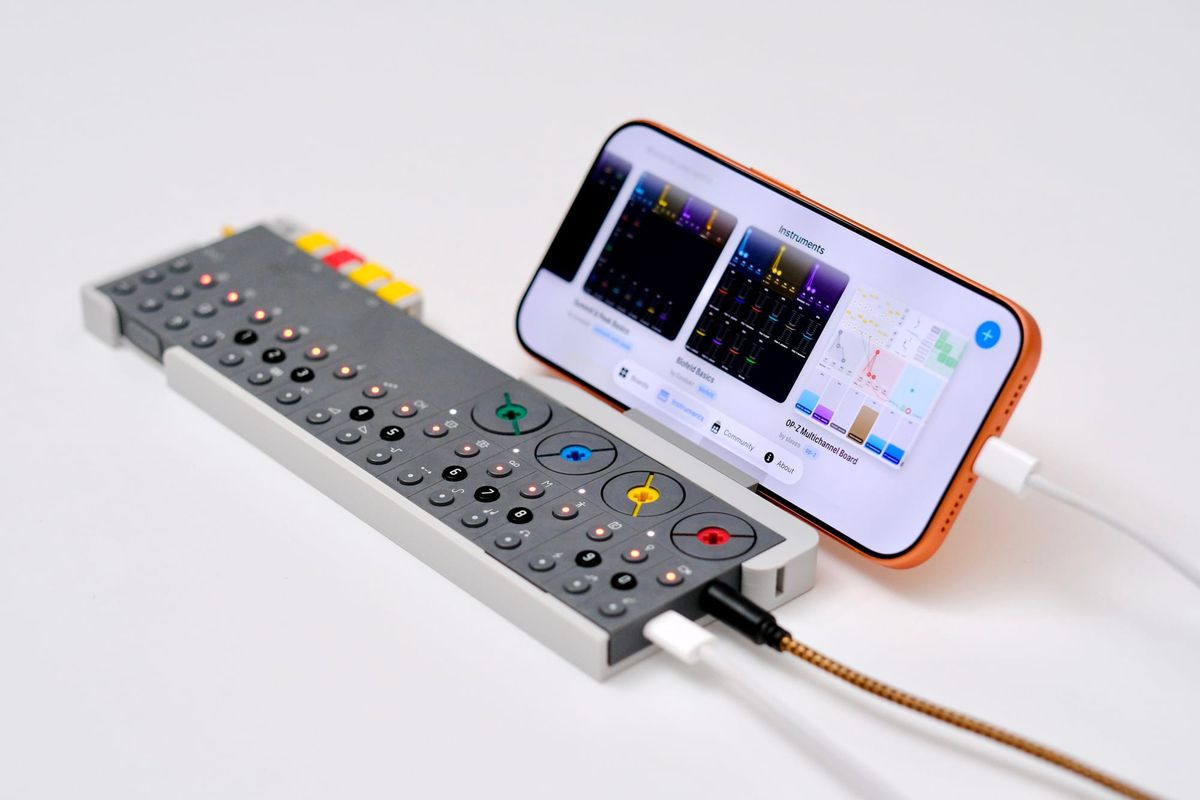
Condukt 1.3 is the biggest update since launch. There's a community of boards to pull from, a looper that captures your notes and exports them as MIDI, a synth that lives inside the app, an envelope editor that reaches into all your hardware, and an iPhone layout that finally does the small screen justice.
Here's what's new.
Community: Boards Built by Other Condukters
The new Community tab is a catalog of boards made by people who use Condukt, ready to install with one tap. See a board built for the synth in front of you? Tap it, install it, and start playing. No rebuilding from scratch.
Every board remembers which synths it controls. Build a Microfreak board you love, share it, and every other Microfreak owner gets to benefit. Add your socials and they'll be linked from the board's page.
Boards group into per-manufacturer sections (ELEKTRON, KORG, MOOG, etc), so it's easy to browse by the gear you own. We made a big push to cover the most popular synths, and if yours didn't make the cut, share the board you built for it.
This feature is yours to shape, tell us what else you’d like to see.
A quick demo of Community Boards and new controls in 1.3
The Recorder: A Looper That Captures Everything
The Recorder is a beat-synced tape looper that captures gestures and notes from anywhere on your board, plays them back in a loop, and exports the take as a MIDI file.
Wire it to a Fader, an XY Pad, a Crossfader, a sequencer, or the new MIDI Notes Input, set a tape length, and hit REC. It arms intelligently: punch in mid-lap for a quick fix, or engage in the last quarter of the clip to catch a full lap when it restarts. The clip rolls straight into Play so you hear the loop immediately.
It captures everything routable. Fader moves, two-axis XY Pad gestures, Crossfader morphs, and full sequencer note streams from the Phrase, Cartesian, and Turing sequencers. Each note replays on the channel it was captured on, regardless of how the board changes around it. Drag a range over the tape to loop just a slice of the take, snapped to a musical grid.
When you've got something you like, export it. Any tape becomes a standard MIDI file you can drop into your DAW. Notes carry their captured channel, fader moves export as CC changes. And because recordings save with the board, reopening a board brings the take back exactly as you left it.
MIDI Notes Input: Bring In Your Keyboard
The Recorder needed more inputs to record, so 1.3 adds a MIDI Notes Input control. It's a small source that listens to incoming MIDI notes and lights up a grid as you play.
Route it into the Recorder and a performance on your external keyboard gets captured straight to tape. It's built as a general routable source, so it feeds the Recorder and any other routable control.
Condukt Poly: A Synth Inside the App
Condukt has always controlled your hardware. Now it makes sound of its own. Condukt Poly is the first in-app synth: an 8-voice subtractive instrument with two oscillators, noise, a Moog-style ladder filter, a dedicated filter envelope, and glide.
Its parameters surface in the same parameter browser as everything else, so they route into faders, sequencers, and the Recorder exactly like a hardware synth would. A patch editor gives you interactive ADSR envelopes and paired oscillator and envelope sections, with five factory presets and Save As to keep your own.
Each channel running Poly gets its own audio instance, so two Polys hold independent patches and play at the same time. It also means a shared board that uses Poly just plays. Install a board built around Condukt Poly and the channel sets itself up, no hardware required.
It's a great way to sketch an idea, learn the app without anything plugged in, or layer a soft voice under your rig.
Envelopes: Edit the Shape of Any Sound
Condukt 1.3 scans your connected synths and finds their envelopes automatically. AD, AR, ASR, AHD, ADSR, and more, pulled out of each device's parameters and surfaced as interactive curve editors. We found some 553 envelopes across 210 devices!
Instead of hunting for attack and decay CCs and nudging faders, you grab the curve and shape it. The editor is bound to the underlying CCs, so a fader or LFO on the same parameter stays in sync. Time stages use a perceptual curve, so small attack and decay values are easy to dial in.
A Third Axis for the XY Pad
If you're on iPad with an Apple Pencil, the XY Pad now captures pressure as a third axis. Press harder and Condukt records a Z value (0 to 1) alongside X and Y, stored per point so the path renders at variable thickness as you draw it.
Z is routable like any other source. Send it to velocity and your gesture's pressure shapes how hard each note hits. Finger touches fall back to a neutral middle value, so nothing breaks when you put the Pencil down.
Oh, and the XY Pad’s recorder can now replay your finger gestures at a much slower speeds (100x slower), for some great ambient build ups.
A Much Better iPhone
Condukt is meant to go anywhere, and that means it has to feel right on a phone. We did a bunch of work in 1.3 to get this right.
The board zoom now goes below 1x, adding 0.25x, 0.5x, and 0.75x so you can see more of the grid at once, which makes fader work on iPhone far more comfortable. Zoom saves per board. Horizontal swipes use velocity tiers now: a nudge steps one column, a short swipe jumps exactly one viewport, and a long flick drifts freely. Controls you add from the picker will now try to stack into visible grid slots, instead of being added off screen. Multi-channel instrument tiles look better now with channel badges.
Everything Else
- Custom MIDI definitions: point an instrument at your own MIDI.guide-format CSV to rename generic parameters, label routable CCs, or fully define a device that isn't in the database yet
- Audio routing follows your gear: plug in an interface, headphones, or start AirPlay mid-session and the audio engine follows the new output
- Wider LFO range carried forward, with a perceptual board zoom menu that's now tap-discoverable instead of hidden behind a long press
- Sharper everywhere: crisper board thumbnails, higher-quality icons, and smoother scrolling through big rigs
- Plus a long list of smaller fixes and refinements throughout
That's Condukt 1.3. Don’t forget: if you build a board you're proud of, share it. We can't wait to see what shows up in the Community catalog.